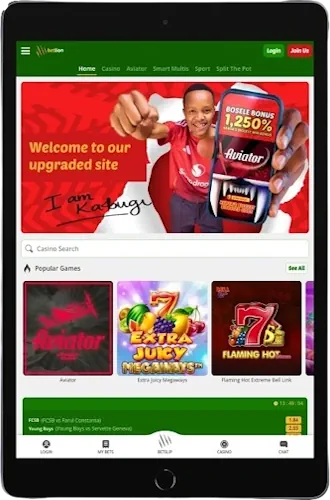
Mobile Betting Applications
Betlion Kenya provides native Android application alongside mobile-optimized website for iOS users. The Android APK weighs around 15MB—downloads quickly even on 3G connections. iOS bettors access full functionality through Safari or Chrome mobile browsers without installing anything.
Both platforms support M-Pesa integration, live betting markets, casino games from Pragmatic Play and Evolution, plus that Aviator crash game. Android app gets updated roughly every 4-6 weeks; the mobile site receives continuous improvements without requiring manual updates on your end.
Key Application Features
📱
Instant Bet Placement
Tap odds, enter stake, confirm bet—concludes in 3 seconds. Betslip saves selections if you exit app.
💰
M-Pesa Transactions
Deposits process without leaving app interface. Paybill 212927 integrated directly into deposit flow for convenience.
⚽
Live Match Tracking
Real-time score updates during matches. In-play odds adjust as game situations develop throughout 90 minutes.
🎰
Casino Access
Slots, live dealer tables, Aviator—all accessible through app. Games load fast on 4G connections typically.
🔔
Push Notifications
Get alerts for bet settlements, bonus offers, match kick-offs. Disable them in settings if they annoy you.
⚡
Quick Login
Biometric authentication available—fingerprint or face unlock. Saves time versus typing password every session.
Android Installation Steps
Downloading the Betlion Kenya APK requires enabling installations from unknown sources. Navigate to Settings → Security → Unknown Sources, toggle that on. This permission lets you install apps outside Google Play Store.
Download Process
Visit betlion.ke through Chrome or any mobile browser. Tap the menu icon (three horizontal lines) top left corner. Select "Download Our App" option—APK file starts downloading immediately to your Downloads folder. File size approximately 15MB; download completes in 30-60 seconds on decent 4G connection.
Installation & Launch
Open your Downloads folder once file finishes. Tap the betlion.apk file. Android asks permission to install—hit "Install" button, wait about 20 seconds. App icon appears on home screen after successful installation; tap it to launch and login with existing credentials or register new account.
iOS Mobile Site Access
Betlion doesn't offer dedicated iOS app through App Store currently. iPhone and iPad users access services via mobile-optimized website instead—works fine honestly, just lacks offline functionality.
Creating Home Screen Shortcut
Open Safari, navigate to mobile.betlion.ke. Tap the Share icon (square with arrow pointing up) at bottom of screen; scroll down, select "Add to Home Screen". Name it whatever you want—"Betlion" works. Icon appears on home screen behaving similarly to native app, though it's technically just bookmark to the mobile site.
This shortcut opens directly to betting interface without Safari's address bar cluttering screen space. You still need internet connection always since it's web-based rather than installed application.
Platform Capabilities
🏀
Sports Markets
Football, basketball, tennis—same markets as desktop. Accumulators, BTTS, handicaps all available mobile.
💳
Payment Methods
M-Pesa, Airtel Money integrated. Minimum KES 50 deposit maintained across all platforms consistently.
🎮
Game Selection
500+ slot machines, Evolution live casino, virtual sports betting. Aviator runs smooth on newer Android devices.
📊
Bet History
Review past wagers, check settled bets, track profit/loss. Data syncs between mobile and desktop automatically.
🔐
Security Features
SSL encryption protects data transmission. Two-factor authentication optional for additional account protection layer.
💬
Customer Support
Live chat accessible through app interface. Response times usually under 5 minutes during daytime hours.
System Requirements & Compatibility
Android app requires version 5.0 (Lollipop) or newer—covers basically every phone from last 8 years. Storage needs about 50MB free space after installation including cache data. RAM usage stays under 100MB typically; won't drain battery excessively compared to other betting apps.
iOS mobile site works on iPhone 6 and newer models running iOS 12+. Safari browser recommended though Chrome functions adequately. Older devices might experience slower page loads; upgrade to newer iPhone if performance bothers you significantly.
Internet Connection Needs
Minimum 3G connection required for basic functionality. Live streaming (when available) demands 4G speeds; otherwise video buffers constantly making it unwatchable. Wi-Fi obviously provides best experience—use it at home or cafes around Nairobi whenever possible to conserve mobile data.